This is default featured post 1 title

Go to Blogger edit html and find these sentences.Now replace these sentences with your own descriptions.This theme is Bloggerized by Lasantha Bandara - Premiumbloggertemplates.com.

This is default featured post 2 title

Go to Blogger edit html and find these sentences.Now replace these sentences with your own descriptions.This theme is Bloggerized by Lasantha Bandara - Premiumbloggertemplates.com.

This is default featured post 3 title

Go to Blogger edit html and find these sentences.Now replace these sentences with your own descriptions.This theme is Bloggerized by Lasantha Bandara - Premiumbloggertemplates.com.

This is default featured post 4 title

Go to Blogger edit html and find these sentences.Now replace these sentences with your own descriptions.This theme is Bloggerized by Lasantha Bandara - Premiumbloggertemplates.com.

This is default featured post 5 title

Go to Blogger edit html and find these sentences.Now replace these sentences with your own descriptions.This theme is Bloggerized by Lasantha Bandara - Premiumbloggertemplates.com.

Showing posts with label Phreaking. Show all posts

Thursday, April 28, 2011

Symbian Underground Aplications "Gullz Collection"


bluetooth
BT Switch Toggle bluetooth on/off in one click (for S60v3 FP1).
BTSwitch Toggle bluetooth on/off in one click (for S60v3 FP2).

calculators
Calc4M Simple and scientific mode, physical constants built in, many conversion options.
Calcium Very simple calculator.
Calc Sheet Lite Bare bones spreadsheet program.
cCalc Scientific calculator.
GraphViewer Graphing calculator.
Nokia Enhanced Calculator Simple and scientific mode, and loan calculator option too.

call managers, answering machines, blacklisters
Anfy CallFilter Blacklist (hangs up on unwanted callers).
Auto Call Back Reduce call costs by automatically calling back without picking up.
FreeCallSprite Make your phone shake when the other end of the line picks up.
MobieGenie Answering machine, blacklist (hangs up on unwanted callers). Alt. download location with more info.
StopCall Blacklist (hangs up on unwanted callers). Python required.
Total Patrol Loud and vibrating notifications of missed calls, messages, and low battery status

call recorders and dictaphones
Alon MP3 Dictaphone Call recorder (beepless), dictaphone, music player, internet radio. (not free)
AudioNotes Call recorder, dictaphone. Clutters the root folder of your phone memory or memory card. (not free)
Total Recall Call recorder, dictaphone. Beepless recording. Free for a link.

camera
cCam Make pictures without camera shutter sound. Make sure you have a memory card or the app will crash.
PhotoRite Shoot without camera shutter sound. Lots of effects. (not free)

chat, instant messaging, voip, sip calls, skype
eBuddy IM on GoogleTalk, MSN, Yahoo, AIM, myspace. For java. Plus web interface for your (phone) browser. Adware.
fring Call on GoogleTalk, Skype, SIP. IM on GoogleTalk, MSN, ICQ, Yahoo, Skype, Twitter. Good interface. Adware.
IM+ IM on GoogleTalk, MSN, ICQ, Yahoo, AIM, Jabber. Well designed interface. Eats lots of memory. Costs too much.
IM+ for Skype Call on Skype. Clean interface. Expensive, so check out the free alternatives.
Morange Instant messaging, email, RSS feed reader, web browser, and more. None of them done right. Adware.
Nimbuzz Call on GoogleTalk, Skype, SIP. IM on GoogleTalk, MSN, ICQ, Yahoo, Skype.
Nokia Chat / Contacts on Ovi IM on Nokia's chat network, GoogleTalk, and other Jabber-based IM networks.
Palringo IM on GoogleTalk, MSN, ICQ, Yahoo, AIM, Gadu-Gadu. Functionality OK, interface has improved a lot recently.
Slick IM on GoogleTalk, MSN, ICQ, Yahoo, AIM, Jabber. Well designed interface. Free beta test version.
Talkonaut Call and chat on GoogleTalk, MSN, ICQ, Yahoo, AIM, SIP, but not on Skype. Stores multiple SIP accounts.

dictionaries, translation
Dictionary by Simon Judge Websters English Dictionary.
Dictionary by Vikrant P. Chavan Another english dictionary. Has all the four letter words.
DictionaryForMIDs Many language pairs available, and Websters English Dictionary too. But not all at the same time.
Dicts.info Various language pairs.
JLearnIt Fifteen languages in one package with an excellent user interface.
KODi Various language pairs, each in different versions.
MDictionary Simple and efficient user interface, various language pairs including english-chinese.
Nokia Mobile Dictionary Multi-language dictionary. Look up and translate words, and have your phone pronounce them.

email
flurrymail Email client with integrated feed reader. Adware.
GMail Mobile GMail client. Lets you read stored mail and write new messages offline.
Mobiquus Push email service and email client. Adware.
OnePennyMail Bare bones email client with a clever trick to mimick push email. Doesn't cost you a penny.
Nokia Email Nokia's old email client and push email service, which is now Nokia Messaging.
Nokia Messaging Nokia's email client and push email service. Free for the time being.
Seven Push email client in beta testing. Free for the time being.

file browsers, search tools, task managers
ActiveFile File browser, task manager, text viewer, screenshot app, sms creator, sms backup and restore tool.
FExplorer File browser, task manager, text editor and screenshot app.
Jbak TaskMan Task manager that shows hidden tasks, program launcher, and more.
KillMe Easy to use task manager that shows hidden processes.
Nokia Search File/calendar/message browser and Google Desktop-like search engine for phone and web content.
SExplorer File browser, text editor.
T9 Nav Search tool for contacts, settings, media files, bookmarks, applications, and calendar entries on your phone.
X-Plore File browser, task manager, text editor, image viewer, word document viewer, zip/rar/jar extractor, zip utility.
Y-Browser File browser, text and image viewer, zip utility (through plugin).

image viewers
Nokia Photo Browser Image viewer with face recognition.
Panda Image Browser Simple image viewer.
Resco Photo Viewer The best picture viewer fo Symbian. (not free)
To The Point Simple image viewer, user interface could be better.

media players
CorePlayer Plays lots of video and audio formats. (not free)
DivX Mobile Player Plays DivX video.
Handy Music Very simple music player, not suitable for large music collections.
Kugou Music player full of bugs.
LCG Jukebox Music player for mp3 and ogg. Navigates folder structure, not mp3 tags. (not free)
Mobbler Last.fm radio player and music scrobbler.
MobiTubia YouTube video player.
Music Launcher Music player that plays music organised in folders.
Nokia Internet Radio Find online radio station, click, listen.
PowerMP3 Plays mp3, ogg, aac, and mp4. Navigates mp3 tags and folder structure. Free beta test version.
Symbian S60 mp3 player rant Why is there no Symbian version of WinAmp?
TTPod Free alternative for LCG Jukebox.
WMV player Play Windows Media Video on your phone.
YouTube for Symbian YouTube's official YouTube video player.

media tools
Audio Tuner Tune your guitar, piano, bass, and more.
FreeCoolCalls Play music or other sounds during your phone calls.
Shazam iD What's that song playing? Point your phone at the music and find out with Shazam iD.
Sleep Music Switches off your media player (or any other program, or your phone) when it has played you to sleep.

navigation
8motions Maps, satellite images, geotagged photos, GPS tracking, and much more. Online only.
amAzeGps Maps, satellite images, and free voice navigation. Online only.
Google Maps Maps, satellite images, streetview pictures. No voice navigation. Online only.
Locago Online maps, screen navigation, integrated Wikipedia, weather, Reuters news, Yellow Pages, and much more.
Locify Online maps and satellite images from different sources. Locally stored maps too. And weather, Wikipedia, Panoramio pictures.
Map24 Mobile Online maps. Better maps but less features than Google Maps.
Métro Public transport navigation tool. Subways, trains, trams, buses, and ferries for hundreds of cities.
Mobile GMaps Online maps and satellite images from different sources, and map downloader for offline maps.
Mobile Maps Locally stored London street map, tube maps, bus map, and night bus map.
Nav4All Online maps, navigation, parking space reminder. Free for the time being.
Nokia Maps Locally stored and live maps, and satellite images. GPS and voice navigation, city guides. Map browsing free. Free trial to test the other features.
Nokia Map Loader Alternative Nokia Map Loader is a horrible program, but you can download maps without it.
skobbler Online maps, GPS and voice navigation. Free, but new and experimental and full of bugs.
Route 66 Locally stored maps. GPS and voice navigation. Voice navigation. (not free)
TomTom Locally stored maps. GPS and voice navigation with external GPS device. Installation guide. (not free)
We-Travel Locally stored maps. GPS and voice navigation. Free, but new and experimental.

notes
Life Remarks Notes program in diary format. With password protection.
MyNotes Symbian's built-in Notes application does its job, but MyNotes does more. Includes password protection and encryption.
Notes On The Phone Electronic Post-it notes for your phone screen.
SafeNote Notes program with encryption.
Secret Codes Encrypt the notes, pin codes, passwords and other secrets on your phone to keep others out of your secret data.

pdf
Foxit PDF Reader PDF reader for Symbian UIQ

screenshot
Best ScreenSnap Works with camera button (but with shutter sound) on phones without stand-alone edit key.
Screenshot Works on phones without stand-alone edit key. For Symbian S60 and UIQ.
ScreenSnapS60 Not for phones without a stand-alone edit key.
SuperScreenshot Can overlay your screenshots with watermarks and timestamps. Works on phones without stand-alone edit key.

signing: sign symbian programs, install unsigned programs
FreeSigner Sign and unsign .sis files on your phone
MobileSigner Sign .sis files on your phone.
SignSIS Sign .sis files on your computer.
SIS installer mod Install unsigned .sis files on your phone.

sms
Active SMS Lock Protect your SMSs with a PIN code, or hide them from the messaging application.
Free-iSMS Threaded SMS, scheduled SMS, fake SMS.
Nokia Conversation Threaded SMS.
Smser Threaded SMS display with password protection.
X-SMS Backup and restore your SMS messges.

symbian customisations
all Symbian hacks Hacks for Symbian S60 and Symbian UIQ.
FreeCaller Make your phone show full screen contact images instead of thumbnails for incoming calls.
FreeFSWP Display your standby image full screen.
GDesk Make your own standby screen. GDesk documentation.
Menu Editor Prettify your phone by editing menus, folder icons, and program names.
rotateMe Rotate your phone screen 90 degrees by button or accelerometer.
SIM directory Shortcut to your SIM contacts.
SajiOS Symbian standby screen alternative.
Themes Launcher Bring back the missing Themes shortcut on new Nokia phones.

symbian hacks
all Symbian hacks Hacks for Symbian S60 and Symbian UIQ.

symbian tools and extensions
AutoSisInstaller Automatically install programs without having to click on confirmations, warnings, etc.
FreeTimeBox Synchronise your Symbian clock with a time server and display it on every screen of your phone.
Light Control Advanced light settings for your screen and keypad, use your phone as a flashligh, let your phone blink SOS.
MapDrives Map folders to virtual drives.
Masturbator Pro Turn your phone into a vibrator. Don't get your battery wet ;)
PhoNetInfo Display all the system details of your phone and networks.
PyFolder Virtual folder with your Python scripts as icons for quick and easy access.
Python for S60 The Python programming language. You'll need this if you want to run Python apps on your phone.
SISContents View, extract, and edit .sis installer files on your computer. Windows only.

text editors
DEdit Text editor with many options.
EasyEdit Simple text editor with clean user interface. Python required.
LightNotepad Simple text editor.
Ped Very simple and efficient text editor. Python required..

themes
themes Themes for S60v3 + links for other flavors of symbian.

timers, clocks, stopwatches
Best Timer Stopwatch and timer, well designed interface. (not free)
Buzzer Very simple free countdown timer.
FreeTimeBox Synchronise your Symbian clock with a time server and display it on every screen of your phone.
QuickStopwatch No frills stopwatch.
Stopwatch Stopwatch with split & lap timing.
Time Machine Stopwatch and timer, not so well designed interface. (not free)
Timer switch Task timer that automatically starts and stops programs at the times you want.

web browsers and tools
iPhonesque mod Make web sites display the Firefox, Internet Explorer, iPhone, or Blackbery version of their site in your Symbian browser. Python required.
Open a new window quick The fast way to open a new window in Symbian's native browser.
Opera Mini Compresses content to reduce data charges. Built-in up- and download manager and offline browsing.
Skyfire Slow bull featured web browser with video, audio, flash, etcetera.
TeaShark Compresses content to reduce data charges. Tabbed browsing and built-in ad blocker.
ucweb Compresses content to reduce data charges. Built-in email client, download manager, tabbed browsing.

Wi-Fi
FreeAir Find free open Wi-Fi connections.
JoikuSpot (Light) Use your phone with 3G internet as a wireless router to connect laptops etc.
WeFi Find the best free open Wi-Fi access points. Only works on old Nokias with Feature Pack 1

Free Call to Any Country Works 100%


Using this VOIP program, you can call landline numbers in any country for FREE."

FreeCall is still a Freeware app but you only get 300 minutes a week.

To bypass this restriction:


http://www.freecall.com/en/download.html


Keep the setup.exe. Freecall's protection system is quite flawed, when the program announces you cannot use any more minutes = Uninstall and reinstall and it will reset your 300 minutes which only takes a moment.


A)You MUST make an account with the program when it loads up. Then when your logged in (it will say at the bottom: 'The client is logged on')


B)Go to the dial pad TAB, ignore the on screen buttons, at the bottom type in your number and remember you need to add country codes at the beginning - NO spaces in the number either.


C) And it does do all countries for free - i've used it from NZ to england, USA, Spain and Aussie and they used it back.


D) If it didn't work, you need to check your firewall settings etc, this is an obvious but a program like this needs full access. .

Send SMS or Text Messages to Cellular phones


Many cellular carriers assign email addresses to cellular phone numbers and support SMS or text messaging by email. You don't need to install special add-ins in Outlook to send text messages, but the recipient will need text messaging enabled on their cellular plan (most carriers enable it by default) and have a phone capable of receiving text messages (most new phones are text-capable).
To use, compose a short email message using less than 160 total characters in Outlook (or any email client) and address it to the cellular number at the carrier's email domain. Remember to remove your signature from the message before sending. Note that some carriers will break apart larger messages into 160 character messages, others will deliver only the first 160 characters.
The phones only support plain text messages but the carriers strip multipart HTML, so you don't need to remember to switch to plain text format.
Email sent to cell phones is billed to the subscriber as a text message.

US Cellphones

The major US cellular carriers use the 10_digit_number@cell.carrier_domain.com format for SMS to text capable cell phones, with a limit of 160 characters in the subject and message body (total).
Carrier Send Email to phonenumber@....
Alltel @message.alltel.com
AT&T @mms.att.net
Nextel @messaging.nextel.com
Sprint @messaging.sprintpcs.com
SunCom @tms.suncom.com
T-mobile @tmomail.net
VoiceStream @voicestream.net
Verizon @vtext.com (text only)
@vzwpix.com (pictures and videos)
Verizon users can register an alias at vtext.com to give out instead of their phone number. Both alias@vtext.com and phone_number@vtext.com will be valid addresses for the phone.

Web Based Interfaces

If you know the phone number and carrier, you may be able to send SMS from a web page.
Verizon http://www.vtext.com
Back to Top

More Information

For a list of Outlook and Exchange Server SMS tools to forward reminders to your cellular phone, see


  • Pager, SMS, and Other Mobile Notification Tools


  • How to Unlock SIM Card | Download SIM Unlock v.1.2 - cracked

    ............................................................................................................................... 

    How to Unlock SIM Card | Download SIM Unlock v.1.2 - cracked

    SIM Unlock v.1.2 - removes protection from the SIM card, and quickly determine the PIN.
    The program is suitable for all mobile operators of GSM 900/1800 standard

    Title: SIM Unlock v.1.2
    Year: 2009 (update)
    Language: Russian
    The medicine: not required
    Size: 11 Mb


    Free GPRS Settings for All Mobile Operators (India)

    Free GPRS Settings for All Mobile Operators

    Airtel Live

    Profile Neme: Live
    Homepage: http://live.airtelworld.com
    Username: blank
    Password: blank
    APN: airtelfun.com
    Proxy and Server Adress or IP: 100.1.200.99
    Port: 8080
    Data bearer - GPRS or Packet Data.
    Authentication: normal

    Airtel GPRS or Mobile Office

    Profile Neme: mo
    Homepage: http://google.com
    Username: blank
    Password: blank
    APN: airtelgprs.com
    Proxy and Server Adress or IP: 202.56.231.117
    Port: 8080
    Data bearer - GPRS or Packet Data.
    Authentication: normal

    IDEA

    Profile Neme:Idea
    Homepage: http://wap.ideafresh.com
    Username: blank
    Password: blank
    APN: imis
    Proxy and Server Adress or IP: 10.4.42.45
    Port: 8080
    Data bearer - GPRS or Packet Data.
    Authentication: normal

    Smart SMARTWAP:

    * Account name : SMARTWAP
    * Access point name: SMARTWAP
    * Home page: http://wap.rworld.co.in/gsm/index.wml
    * Wapgateway proxy IP address: 97.253.29.199
    * Port: 8080

    Smart SMATRNET:

    * Account name: SMARTNET
    * Access point name: SMARTNET
    * Home page: http://www.google.co.in
    * Wapgateway proxy IP address: 97.253.29.199
    * Port: 8080

    Smart MMS:

    * Account name: RTLMMS
    * Access point name:MMS
    * Homepage: http://10.114.0.5/mms/
    * Wapgateway IP: 10.114.0.13
    * Port: 9401

    Vodafone live Settings:

    Account Name - Vodafone Live
    User Name - leave Blank
    Password - leave Blank
    Proxy - Enabled/yes
    Access Point Name - portalnmms
    Proxy - Enabled/yes.
    Proxy and Server address - 010.010.001.100
    Proxy and Server Port - 9401 or 8080
    Homepage - http://live.vodafone.in
    Authentication Type - Normal

    BSNL gprs Settings:

    Account Name - bsnlwap
    Username - leave blank
    Password - leave blank
    Proxy - Enabled/yes
    Homepage - http://wap.cellone.in
    Proxy and Server address - 010.132.194.196
    Proxy and Server Port - 8080
    Acces Point Name - wapnorth.cellone.in
    Data bearer - GPRS/ Packetdata
    Authentication Type - Normal

    BSNL NEW GPRS/EDGE/3G SETTING

    Send an SMS
    ACT 3G TO 53733
    [TOLL FREE]
    BSNL LIVE APN = bsnllive
    IP = 10.220.67.131
    PORT = 8080
    HOMEPAGE = http://bsnllive.in
    BSNL MMS APN = bsnlmms
    IP = 10.210.10.11
    PORT = 8080
    HOMEPAGE = http://bsnlmmsc.in

    BSNL NET
    APN = bsnlnet
    IP = NONE
    PORT = NONE
    HOMEPAGE = http://www.google.co.in

    Need Aircel GPRS/Internet free Setting for Chinese Mobile:

    Using Internet through Mobile:(Pocket Internet)

    * Account name: Aircel Online
    * Home page: http://myaircel.com
    * Access point name: aircelwap
    * Wapgateway IP: 172.17.83.69
    * Port: 8080
    *Username - leave blank
    *Password - leave blank

    Using Internet through Computer:

    * Account name: Aircel Online
    * Home page: http://www.google.com
    * Access point name: aircelweb
    * Wapgateway IP: leave blank
    * Port: leave blank
    *Username - leave blank
    *Password - leave blank

    [Note: Use Data cable to connect to PC using your Mobile PC Suit. Lots of handset is now not supporting internet using blue tooth..].

    Spice

    * Account name: Spice wap
    * Home page: http://wap.spicetele.com
    *Dial up number: 6830
    * Wapgateway IP: 10.200.200.3
    * Port: 8080
    * Carrier type: Data GSM
    *Username - +91 followed by users no.
    *Password - spice

    BPL

    Account Name - BPL WAP
    Username - leave blank
    Password - leave blank
    Proxy - Enabled/yes
    Homepage - http://wap.mizone.bplmobile.com
    Proxy and Server address - 10.0.0.10
    Proxy and Server Port - 8080
    Acces Point Name - mizone
    Data bearer - GPRS/ Packetdata
    Authentication Type - Normal

    Tata Docomo

    Account Name - Tata Docomo Divein
    Username - leave blank
    Password - leave blank
    Proxy - Enabled/yes
    Homepage - http://divein.tatadocomo.com
    Proxy and Server address - 010.124.094.007
    Proxy and Server Port - 8080
    Acces Point Name - TATA.DOCOMO.DIVE.IN
    Data bearer - GPRS/ Packetdata
    Authentication Type - Normal
    Virgin Mobile GPRS/EDGE/3G Setting
    Customer Care No. 121
    Balance check: *111#
    1.Virgin Internet
    (For any mobile chinese,micromax,fly,olive,Karbon,airfone,intex..)
    Profile name- vinternet
    Homepage- http://www.google.co.in
    APN- vinternet.in
    IP- 000.000.000.000
    Port- 0
    Authentification type:Normal
    Bearer:GPRS(if required)
    2.Virgin Internet
    (For Samsung,Nokia New phones.)
    Profile name- vinternet
    Homepage- http://www.google.co.in
    APN- vinternet.in
    IP:(blank)
    Port:(blank)
    Authentification type:Normal
    Bearer:GPRS(if required)
    Uninor GPRS/EDGE/3G Setting
    *For Getting Uninor WAP,Uninor GPRS,Uninor MMS setting Simple send sms
    ALL to 58355

    1.Uninor GPRS Settings
    (For any mobile chinese,micromax,fly,olive,Karbon,airfone,intex..)
    Profile name: uninor
    Homepage: www.google.com
    Enable Proxy
    Ip address: 10.58.10.58
    Port: 8080
    APN: uninor
    Bearer: GPRS(if required)
    2.Uninor GPRS Settings
    (For Samsung,Nokia New phones.)
    Profile name: uninor
    home page:www.uninor.in
    proxy address:(blank)
    proxy port:(blank)
    data account:packet data
    apn:uninor
    authentification type:Normal
    Bearer:GPRS(if required)

    Free GPRS Settings for All Mobile Operators

    Call Spoofing

    Earlier there was a call spoofing method but its not working now, But I have come across a new method fully working. Use it to call anyone using anybode else's number. You can also change your voice pitch so that the other person can't recognize you.

    Warning-Only for educational purposes.

    • 1. Open http://www.crazycall.net
    • 2. Select your country and wait for the page to load.
    • 3. Enter the number you want to display in the first big box (Dont change the contents of small box if the fake number is of same country).
    • 4. Enter the number you wish to call in
      second big box.
    • 5. Choose voice pitch as normal (for same
      voice) or high or low pitch to change your
      voice.
    • 6. Click Get me a code.
    • 7. Dial the number shown on right and
      enter the shown code when asked.

    Latest Free Reliance GPRS Hack [2010]

    Tutorial From Our indian visitor Friend you can also share yours
    Today I will show you how you can surf free GPRS on Reliance enabled mobile phones. This hack was very popular 2-3 years back but it had stopped working. But few days back when i tried to use this hack, to my amazement, I found that this hack was working with a few modifications.
     

    [Image: 1zx8sr9.jpg]

    Follow the steps given below:


    1.Activate Reliance GPRS.


    2.
    Download modded UCWeb version 6.7(Please note that this hack will work only on modded UCWeb version 6.7).

    3. Apply following settings in your Mobile phone GPRS Settings.

    * Name : RelianceMBWorld
    * Proxy Address : 10.239.221.5
    * Port Address : 8080
    * APN : RCOMWAP
    * Homepage : wap.google.com
    * dUsername : blank
    * Password : blank
    * Data Bearer : Packet Data

    4. Now Start your modded UCWeb 6.7. Since you will starting it for the first time it will ask you following setting:

    * Front Query : blank
    * Middle Query : blank
    * Back Query : ?id=jCustomerWAPProv/
    * Uncheck the Checkbox named Remove Port from URL
    * Host : HandlerHost
    * Press OK.

    5. Done!! Enjoy Free GPRS Surfing

    This hack has been tested in Maharashtra on Nokia 3110 c, 5610 and N73 and we found it to be working. Please share your experience in the comment section.

    Send Sms From Friends MobileTo Any Number

    Hello Friends, today i am sharing an awesome trick with you all. Today i will tell you how to send anonymous SMS i.e. How to send SMS from any mobile number to any mobile number that means how to send SMS from your friend's mobile to your mobile or your friends mobile to your friends mobile or any other number. Basically this technique is call SMS spoofing. By SMS spoofing we can send SMS to any mobile using anyone's mobile number. How this trick can be helpful?? its simple it is helpful when you wanna prank your friends, enemies or simply you want to send free SMS to your friends using their numbers only. So friends read on...


    What is SMS Spoofing?
    Spoofing is basically mimic of the original i.e. SMS spoofing basically is a technique to send anonymous SMS to any mobile number. By anonymous i means that we can use any mobile number to send the SMS. 

    This is not actually a trick or hack but it's a service that a company is providing but the only thing the company forgot is internal send ID Check i.e. which number we are using to send SMS. So this service allows us to send SMS from any number to any number that means. Now the number that we register will be shown to the victim.
    Hence we are exploiting the Internal sender ID phone verification feature.

    Feature's of SMS spoofing:
    • Spoofed sms (any mobile number to any mobile number)
    • 100% anonymous  messages
    • Worldwide Network (i.e. we can send SMS all over the world)
    • No advertisements
    • Instant Delivery of SMS


    How to use this Hack? 
    1. First of all, register here . This website looks like this . Fill as i shown below:


    2. After Registering you will get 25 free credits that means you can send 25 free SMS from any number to any number. For using it again register another mobile and email ID. 25 SMS is the limitation of this trick from one registered number.. Usually people have two to three sims.
    3.  Now after registering you will receive password on registered mobile number.
    4. Now login with that password that you got on mobile.
    5. Now go to Send SMS to number . As shown in snapshot below:


    6. After entering the details as explained in snapshot above. Click on send.
    7. That's all the hack. I know its limited but its awesome...Isn't It..

    I hope you all have enjoyed it.. Keep visiting friends for more such hacks...

    Hacking Cell Phones


    Most people know about that nice little menu on Nokia cellies, the
    *3001#12345# menu. You have access to cool menus, the setup of the phone, and the coolest, the field test. That without a doubt in my
    mind is one of the coolest things I have seen on a cell. Sure, those
    bars on the side of the LCD are useful, but i want to know the exact
    Db level. Anyways, go up to NAM 1. Theres a bunch of lists there,
    which I wouldn't recommend fuckin' with. Going down further, you see
    something called P/RSID lists. Open it up, and go down to alpha tag.
    Entering stuff in this tag will allow you to put text on the front
    of the phone! Of course, you have to enter in the info for your
    provider in the other spaces provided, but that won't take too long.
    On some companies, this won't work, so tough luck if it doesn't.

    Security (or lack there of)

    Go find a friend's phone. Is it "locked"? Not any more. Go back to
    the *3001 menu, which is accessible even if the phone is locked, and
    go to the security menu. Using the number provided, you can get into
    the phone. Simple enough.

    Call Forwarding

    First I must give props to Vicious for giving me the idea.
    Call forwarding, if your brain dead, allows you to forward your cell
    number to any other number you want, well, at least I would believe
    so. The code for forwarding can be found from the friendly operator,
    or even in some spam the company sent ya trying to hype new services
    you don't need. There are two types of forwarding, call waiting and
    constant. Call waiting only forwards when you your on the phone, so
    you can send it to a vmail box, and constant is self-explainatiory.
    So, why not get two phones, and call forward them two each other! I
    have tried this, with interesting results. If you call forward two
    cells on the same provider, the cell site figures this out and the
    call is stopped almost immideately. But, if you use two different
    providers, then it will last forever in a loop. Granted, the call
    won't go anywhere, and I didn't hear anything cool when I did it,
    but still fun.

    So go out there and have some fun with one of the most useful and
    annoying devices on this planet!

    PS: If the phone is locked out, or you haven't been paying the bills,
    then the only two numbers to dial are 911 and *611. *611 is tech
    support, so it might be different for you. And props to Tripp for
    http://www.cellularsecrets.net.

    How To Jailbreak iPhone 4G

    Step 1: Download the Greenpois0n from http://cache.greenpois0n.com/dl/gp_win32_rc4.zip (if you think this link is infected search google for greenpois0n and download it )

    Step 2: Extract and run greenpois0n,then plug in your Apple item.

    Step 3: Turn your apple item off.
    [Image: powerOff.png]


    ]Step 4: Press “Prepare to Jailbreak (DFU)” button in greenpois0n, you will be guided by Greenpois0n on how to perform next steps.

    [Image: greenpois0n-jailbreak-how-to-02.jpg]

    Step 5: Follow the steps (try being exact),Once you’re in DFU mode, click the ‘Jailbreak!’ button to jailbreak your iPhone.

    [Image: greenpois0n-jailbreak-how-to-04.jpg]

    Step 6: Now, just wait until the status bar shows complete, and your device will reboot to the home screen.


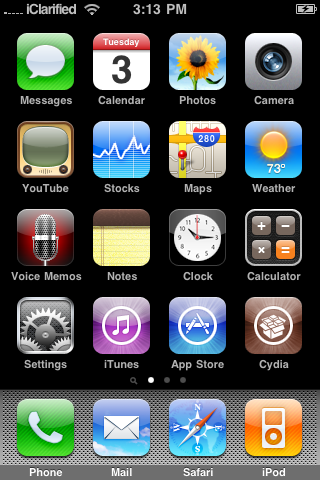
    Step 7: You should now have a new “Loader” icon on your springboard. Launch Loader. Select Cydia > Install Cydia.

    Step 8: One Cydia has successfully been installed, you will be asked if you want to remove Loader. Hit “Remove” and you iPhone will automatically reboot.You will obtain a "Cydia" icon.

    [Image: cydia-crashing-problem.jpg]

    It is JailBreaked :) know lets work on cydia:

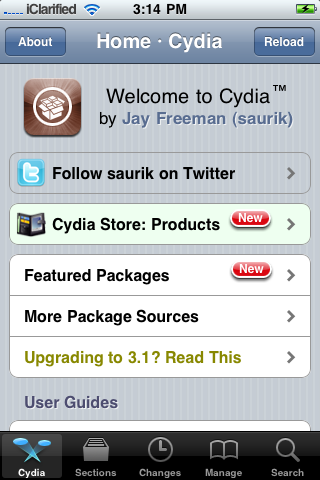
    -Start “Cydia” on your iPhone.

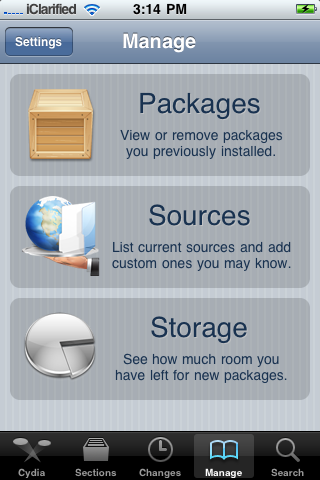
    -Touch on “Manage” tab on the bottom.

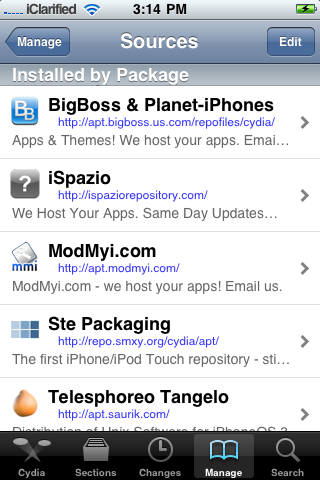
    -Now touch on “Sources”

    -Touch on “Edit” and then on “Add”. You will be prompted to enter a url source as seen in the screenshot below. Type “http://cydia.hackulo.us/” and touch on“Add Source” .

    -Know Go and search for "Appsync" and select your version , I used for my Iphone "Appsync for 4.1 os"

    [Image: AppSync-4.1.jpg]


    -Know Go to itunes on your computer (you should have the apple item ex: iphone plugged into the pc), and download any application , then sync it into your Iphone.

    -We are nearly done ,Open cydia and search for Installous 3 (Note : don't choose Install0us the one with "0")

    [Image: Installous-Cydia.jpg]

    - Open Installous and start downloading apps.
    iphoneblogr.com

    Nokia Phone Secrets


    First things first, Nokia is a worldwide Corporation which owns 36% of the market share. So no doubt alot of you own a Nokia mobile, whether it be CDMA or GSM.

    CDMA : Is a phone which does not need a sim card to run, it just stores everything on the phone.
    GSM : Is a phone which has a SIM card (like Vodafone)

    There are several codes that you can use on Nokia's, i will run through these in this article.
    (Stand-by mode is the main/home screen which displays your battery charge and signal)

    (NOTE: The Service Programming Menu only works on CDMA phones)
    ----------------------------------------------------------------------------------------------

    1. Service Programming Menu - *3001#12345#

    This menu is the mother of all Nokia codes, you can edit your phone like mad here, most of these menus your service provider probably doesn't want you to have the ability to do. So here we go.

    On stand-by mode, type in *3001#12345# and wait a few seconds for it to load up. Once the screen comes up you will have several options, all with different functions. (NOTE: this menu differs on different phones.)

    1. NAM 1
    2. Change SPC
    3. Security
    4. Server addr.
    5. SW version
    6. Serial number
    7. Programmed
    8. Field test

    ----------------------------------------------------------------------------------------------

    1. NAM 1 (* means explained below)

    This is the most useful menu your phone has, it allows you to edit the heck out of your phone! inside NAM 1 there are these different menus:

    Own number*
    Mobile ID number
    A-key code
    Alpha tag*
    Emergency*
    Service No.
    CDMA settings
    NAM status

    Own number:
    Self explanitory, but if you want a new number then this is where you want to go. Just enter this menu followed by the SPC (see Change SPC) then change your number. This DOES work, but the new phone number you want must not already be in use.

    Alpha tag:
    You know on the standby screen, there's the "Vodafone" or "Telecom" or "T-Mobile" that appears? well now you can get rid of that annoying tag. Change this to whatever you please, just to make your phone more personalised.

    Emergency:
    This menu is basically a menu which displays all the numbers that will divert to the emergency number of your area. For example, if you live in USA and your emergency number is 911, in this menu there will be "911","811", "991" and the obvious numbers that you may type in while trying to reach 911. It's smart not to mess with these, because you never know when you'll be in an emergency. There should be some free slots so why not add in a couple more numbers that you want to divert to your emergency?
    Some people think "Wow! emergency number! that calls for free, so maybe if i put in my friends number then it will give me free calls to him/her!" WRONG. This menu can NOT give you free calls. If you were to put in your friends number, then whenever you called them you would end up calling the emergency line - as that's what you're diverted to! REMEMBER THIS!

    ----------------------------------------------------------------------------------------------

    2. Change SPC

    The SPC is the Service Programming Code. This code is rather hard to come across, as the service providers try to hide it from the public so they can't access these places on their phones. But luckily enough if you live in New Zealand then here is the code :)

    147359 - Is the default code that will let you into 'almost' anything
    665*** - Is the 'master' code, that will let you into anything you like.

    (The *** is the last 3 digits of your Nokia model, for example: If your Nokia was model number '8734', then your master code will be '665734'. The 665 is the default number for the Nokia company.)

    So, this menu just means you can change the code. NOTE: Some mean stores when you buy the phone tend to access this menu and change it so that the owner can't access it :( that is not always the case though, so try it out!

    ----------------------------------------------------------------------------------------------

    3. Security

    This menu just shows you the security code that is installed on your phone, couldn't be more bland.
    FUN TRICK: why not have a look at your friend/work mates' phone and access this menu, you could then see their security code or change it just for fun :) But we're nice people and that's naughty, so we arn't going to do that are we..

    ----------------------------------------------------------------------------------------------

    4. Server addr.

    This is the server address of your service provider. Nothing you can do here.

    ----------------------------------------------------------------------------------------------

    5. SW version

    Once again, another menu with not alot of meaning. All you can do in here is check out when your phone was activated, and what version software it is running. This can also be accessed on GSM phones (see below)

    ----------------------------------------------------------------------------------------------

    6. Serial number

    This is your serial number. DUH.
    It would be a wise idea to jot this down somewhere safe, because this could be useful. If your phone was ever lost or stolen then you could contact your service provider and give them this code. This would let them shut the phone down so that your robber couldn't use your phone - or access anything on it for that matter.

    ----------------------------------------------------------------------------------------------

    7. Programmed

    This is just a menu that you can only access once, which lets you type in when your phone was programmed.

    Seem like the menus are getting lamer? Wait for the next one..

    ----------------------------------------------------------------------------------------------

    8. Field Test

    This is an option which is quite cool really. Go into Field test and change "Disabled" to "Enabled". Then get out of the whole service programming menu.
    Now, turn your phone off, and back on again.
    Once it loads up go to your normal menu and scroll to the bottom. Notice you have just added a new menu to your phone? It is called Net Monitor.
    Net Monitor speaks for itself, with this option you can monitor your network to a small extent.
    Enter Net Monitor and it will prompt you with "Group/display:" enter in 3101 and press OK.
    It should take you back to your standby screen, nothing will have changed. But wait a few seconds and then all these numbers will appear on your screen. What do they mean?

    There is only one number you can really understand in this menu. This number is located as the third number down, it will say something like "-50" (the 50 can range anywhere from 10 to 99). This is how strong the signal is.

    For example : If your phone displayed -10 here then it's telling you that your neighbour is a cell site and your signal is really really good.

    If your phone displayed -90 then it's basically telling you that where you live or where you are at that certain time has really bad signal.

    You will notice that as you get closer/further away to a cell site this number will grow or decrease.

    ----------------------------------------------------------------------------------------------

    That sums up the Service Programming Menu, and the extra things your service provider doesn't want you doing :}

    There are many other codes that you can use on CDMA phones, just search around for them.

    Extra Codes:

    *#66767# - This code when spelt out is "NO-SMS", so shouldn't that mean no texting? well, yes. If you enter this code in on your phone then you will no longer have the ability to "Create Message" or "Reply". If you're really mean then enter it on your brother or sisters phone, that's sure to give you some laughs. You can bring them back again by re-entering the code.

    *#639# - This brings you to the menu which just re-programs your phone faster. I wouldn't reccomend you doing this if you value your phone.

    *#7780# - This takes you to a menu which says "Restore Factory Settings", i think you understand what will happen if you press yes :p

    GSM Code:

    This is the only GSM code i know from the top of my head, just search around for more as I'm sure they're out there.

    *#0000# - This is probably the most useless code you can find, but anyway it just gives you information on when your phone was activated. If your phone was sent in for repair, then this date will have changed to the date when it was fixed.

    By sarvesh

    New Working E-Mail And SMS Bomber

    This is the FIRST working virus free SMS bomber that I have found to be successful

    Here is a picture of the icon


    [Image: 647fd4b34de8ea70ba0e00db1d8150ea.png]

    Start up picture


    [Image: 8c0d43eafe7914608c009122edebd2a0.png]


    SMS bomber picture


    Link to Download
    VirusTotal Scan Report

    How To Unlock Your BlackBerry Smartphone Free


    This is a tutorial on how to unlock your BlackBerry.
    To my knowledge it works on all BlackBerry phones but i may be wrong.


    1. Download and install Microsoft NET Framework 2.0

    2. Download and install Blackberry desktop manager v4.7.0.32

    3. Download and install Blackberry Operating System

    4. Delete the vendor.xml file located in c:program filescommon filesresearch in motionapploader

    5. Download and install MFI Multiloader.

    6. Open MFI Multiloader shortcut on your PC and wait until shows up as:

    7. Then your phone should be like this on screen:Unlocking a BlackBerry Pearl

    8. Open Blackberry Desktop Manager on your PC and read how to update/reinstall BlackBerry Operating System explained below. How To update/ReInstall BlackBerry Operating System ? Connect your device to your computer. Open the BlackBerry® Desktop Manager. Click Application Loader. Click Start in Add/Remove Applications or Update Applications. If necessary, perform the following actions: If the Device Security Password dialog box appears, type your device password. Click Next. If the Communication Port Selection dialog box appears, specify a communications port. Click Next. Click Next. Perform any of the following actions: To add an application that appears in the list, select the check box beside the application. To add an application that does not appear in the list, click Browse. Double-click an application loader (.alx or .ali) file. Click Next.

    9. Click Finish.

    10.
    Congratulations, your BlackBerry unlock is done for free! You can now replace your SIM and memory card and set up your phone the way you like it.

    How to Unlock the iPhone 3G, 3GS Using BlackSn0w

    These are instructions on how to unlock the iPhone 3G and 3GS using BlackSn0w. To follow these instructions you must be on the 05.11.07 baseband and have already jailbroken.

    If you have not already jailbroken it will be easier to follow one of these tutorials which will walk you through both jailbreaking and unlocking.
    - Windows
    - Mac
    To check your baseband you can follow these instructions.

    Lets begin...


    Watch the Video!
    For your convenience this tutorial is available in video format also. Click the Watch It button to view the tutorial!


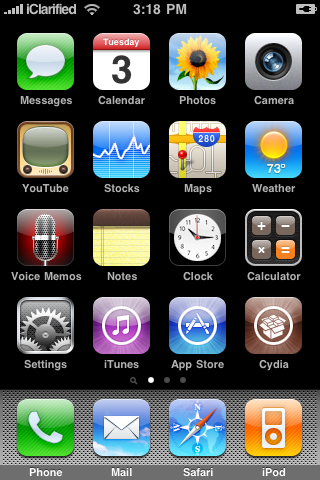
    Step One
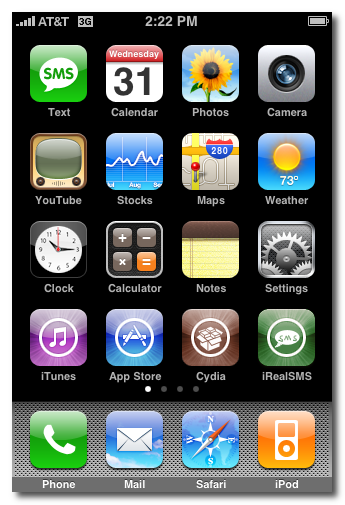
    Press to launch Cydia from your iPhone Springboard.

    Step Two
    Press to select Manage from the tabs at the bottom of the screen.

    Step Three
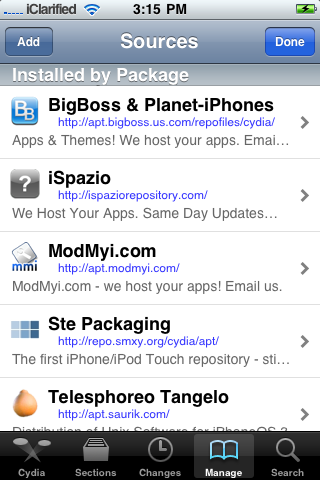
    Press the large Sources button.

    Step Four
    Press the Edit button at the top right of the screen.

    Step Five
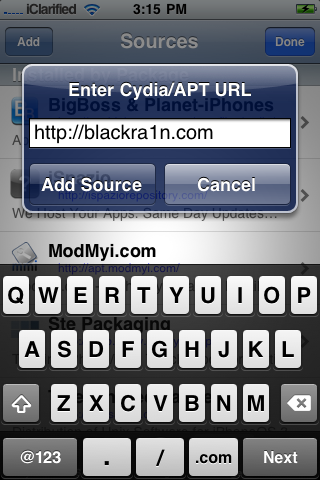
    Press the Add button at the top left of the screen.

    Step Six
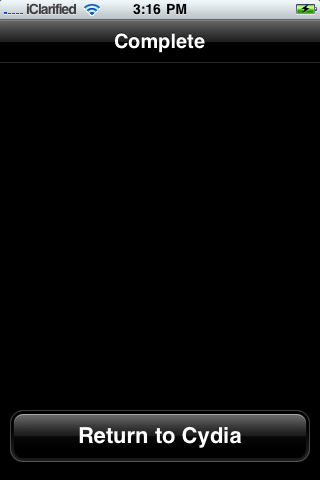
    Input http://www.blackra1n.com as the source address then press the Add Source button. Once Cydia has added the source press the large Return to Cydia button.

    Step Seven
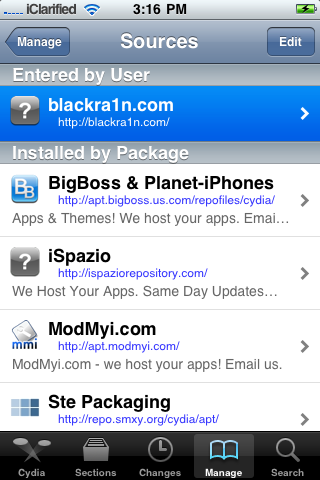
    Press the Done button at the top right of the screen.

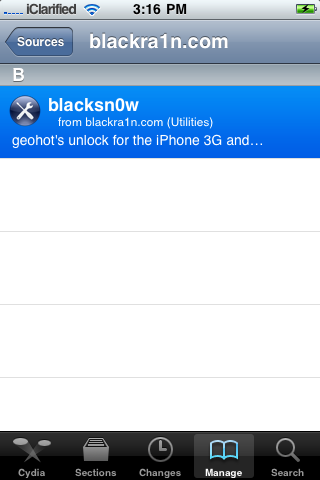
    Step Eight
    Press to select blackra1n.com from the list of sources.

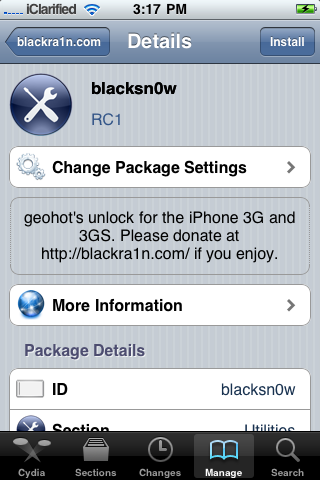
    Step Nine
    Press to select blacksn0w from the list of packages.

    Step Ten
    Press the Install button at the top right of the screen.

    Step Eleven
    Press the Confirm button at the top right to begin installation.

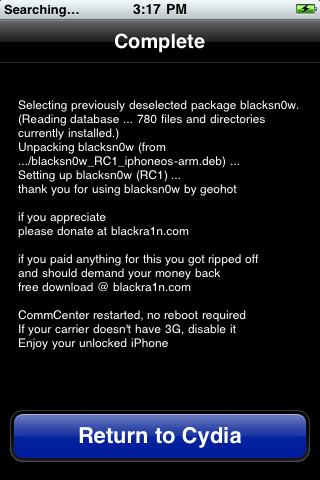
    Step Twelve
    Once the unlock has been installed successfully press the large Return to Cydia button.

    Step Thirteen
    Wait a few minutes for your CommCenter to restart and you will now be able to use the SIM card of your choice on your unlocked iPhone!

    How to Find the Firmware and Baseband Version of Your iPhone

    These are instructions on how to find the firmware and baseband version (modem firmware) your iPhone is currently running.

    Step One
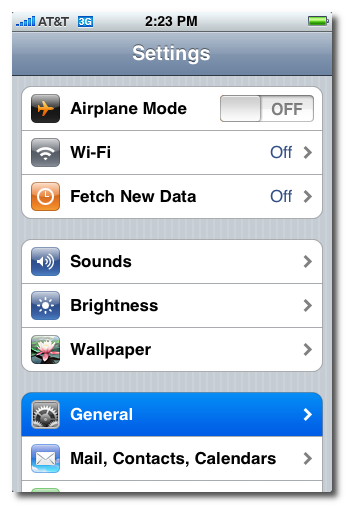
    Press to launch Settings from your Springboard.


    Step Two
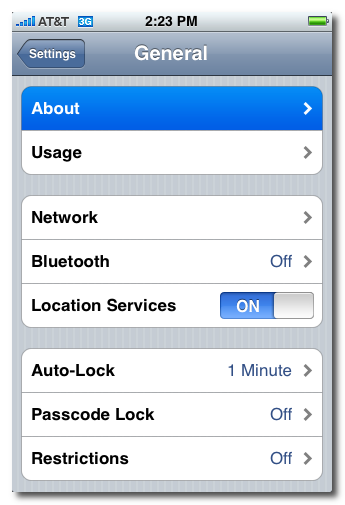
    Press to select General from the Settings Menu.


    Step Three
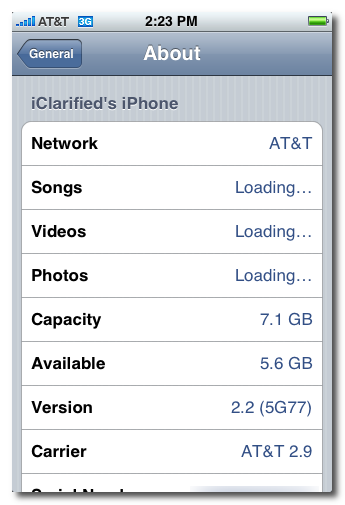
    Press to select About from the General Settings Menu.


    Step Four
    From the about screen you can find your firmware version under the Version label.


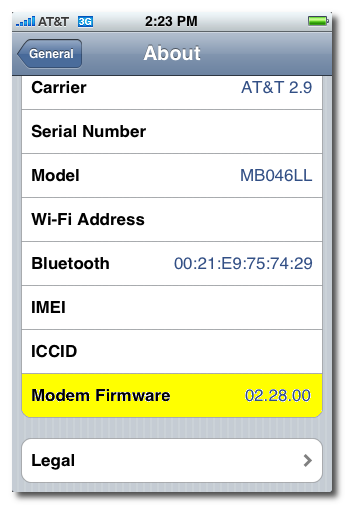
    Scroll down and you can find your baseband version under the Modem Firmware label.

    How to Jailbreak Your iPhone 3G on OS 3.1.2 or 3.1.3 Using RedSn0w (Mac)

     The Windows version of this tutorial is here.
    This tutorial can be used to jailbreak before applying the BlackSn0w unlock. You can find instructions on how to apply the unlock here.

    Step One
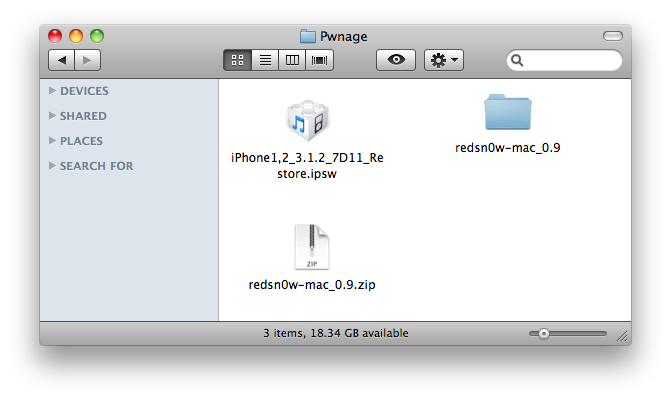
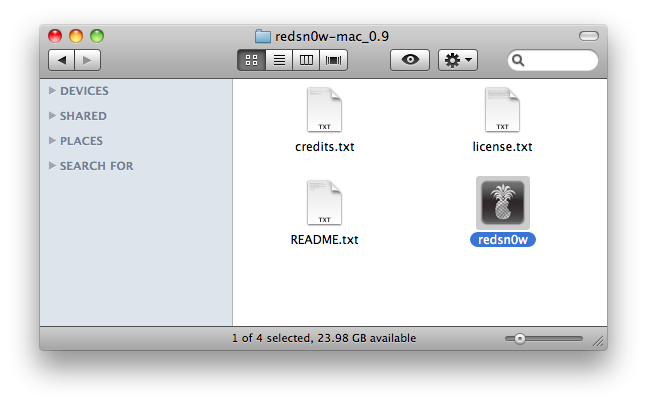
    Create a folder on your desktop called Pwnage

    Download RedSn0w from here and place it in the Pwnage folder. Likewise, download the latest 3.1.2 firmware from below and place it in the same folder.

    3.1.2 (3G): iPhone1,2_3.1.2_7D11_Restore.ipsw

    Extract the redsn0w folder from the RedSn0w zip file to the Pwnage folder.


    Step Two
    ***If you are running iPhone OS 3.1.2 or 3.1.3 you may skip this step***
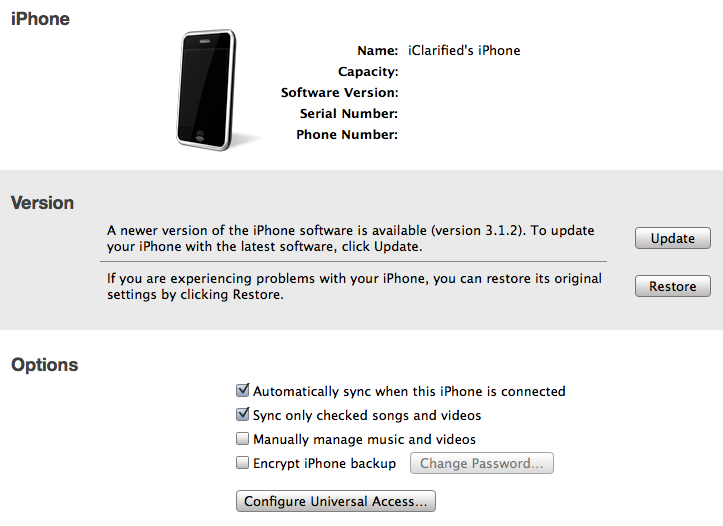
    Connect your iPhone to the computer and launch iTunes.


    Select your iPhone from the list of devices on the left. Now hold down Option and click the Restore button. Restore is preferred as it won't create any wasted space on your iPhone.


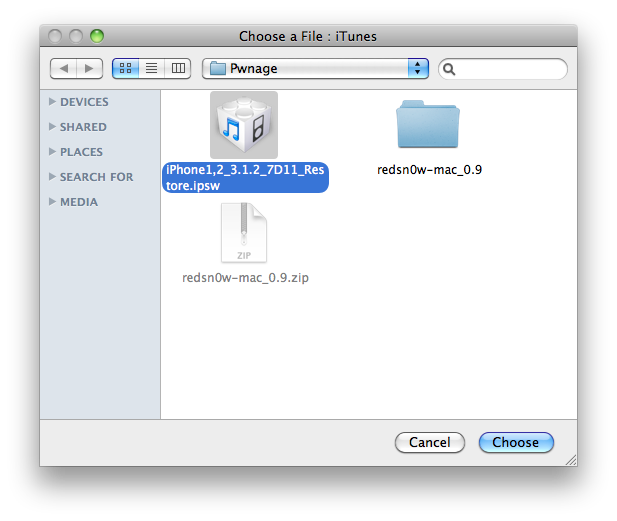
    Navigate to the Pwnage folder on your desktop and select the firmware ipsw. Click the Choose button to continue.


    *Note: If you are already on the 3.1.2 firmware and have not jailbroken then you may skip this step.

    Step Three
    Once iTunes has finished updating your iPhone to the desired firmware open the Pwnage folder on your desktop and launch the redsn0w application from the redsn0w folder we extracted earlier.


    Step Four
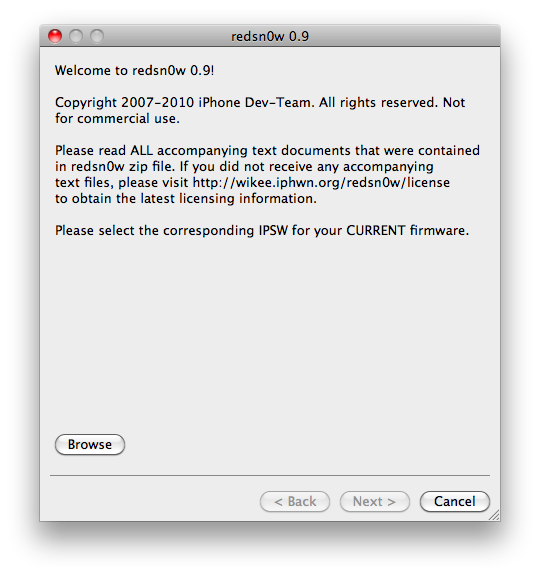
    Once RedSn0w opens click the Browse button


    Step Five

    **Note**
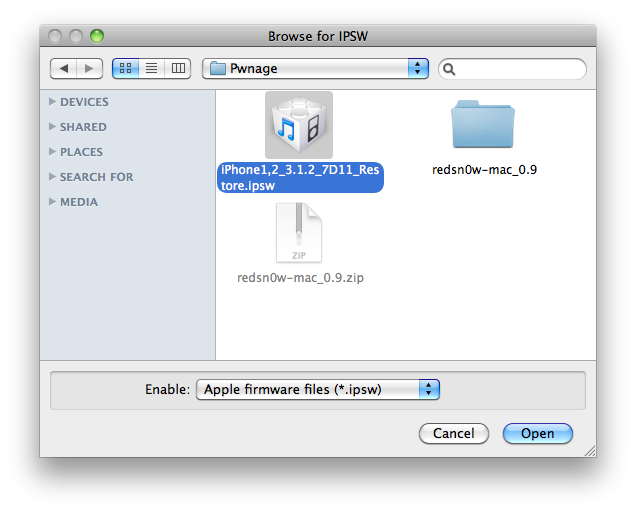
    Even if you are on firmware 3.1.3, still select firmware 3.1.2. Redsn0w works the same way on firmware 3.1.2 or firmware 3.1.3. If you select firmware 3.1.3, you will get an error, as Redsn0w does not recognize the 3.1.3 file yet.

    Select the firmware ipsw we placed in the Pwnage folder on our desktop then click Open.


    Step Six
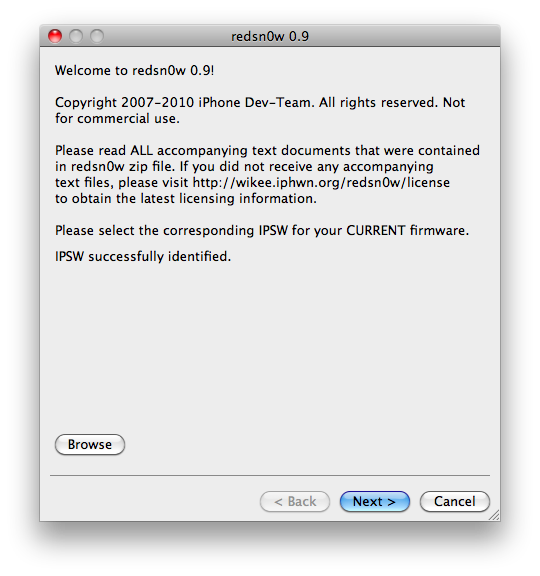
    Once the firmware has been verified click the Next button to continue.


    Step Seven
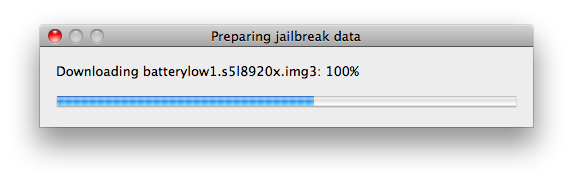
    RedSn0w will now prepare the jailbreak data


    Step Eight
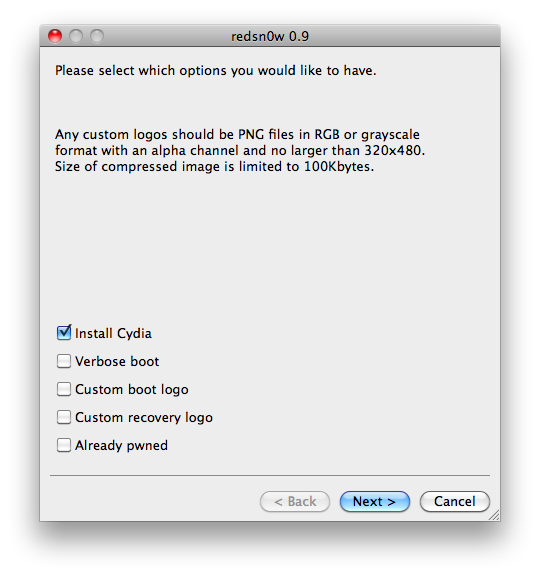
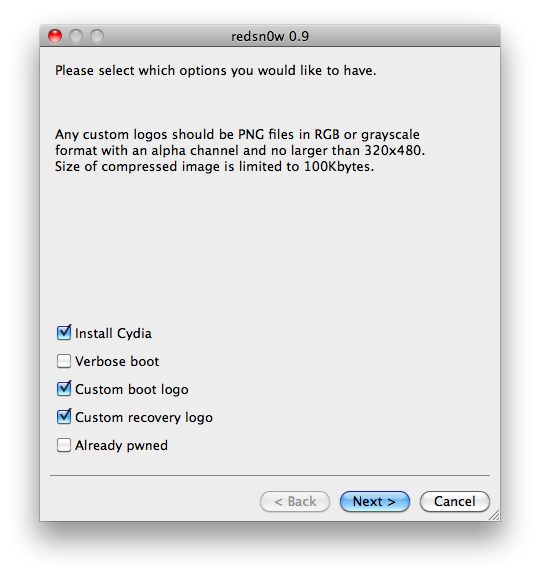
    From this window you can select the jailbreak options you would like. If you have already pwned your device check the Already pwned option.


    Verbose boot displays detailed information on boot of your device and is generally only needed by developers and advanced users.

    Make sure Cydia is selected. For this tutorial we will also select Custom boot logo and Custom recovery logo.

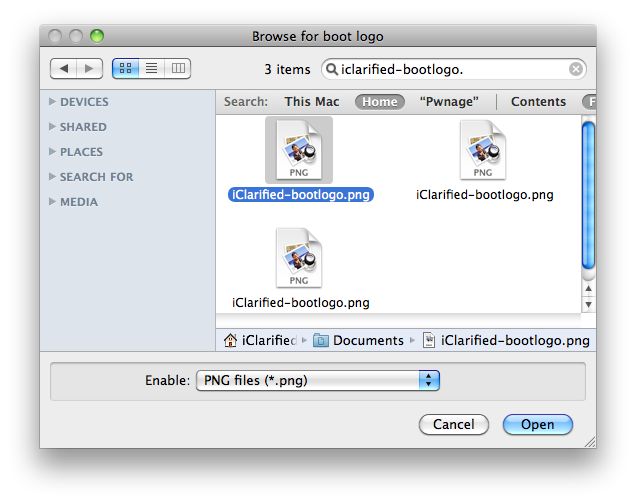
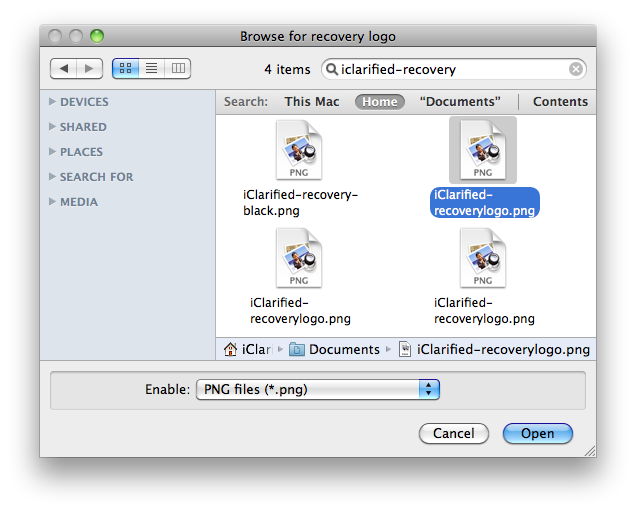
    When you click to select each custom logo option a dialog window will appear asking you to select the image. Locate the image you would like to use then press the Open button.


    *Remember the rules for boot logos are: RGB or Grayscale format with Alpha channel and dimension below 320x480. If you would like to use the iClarified ones they can be found here: Boot Logo, Recovery Logo

    Click the Next button to continue


    Step Nine
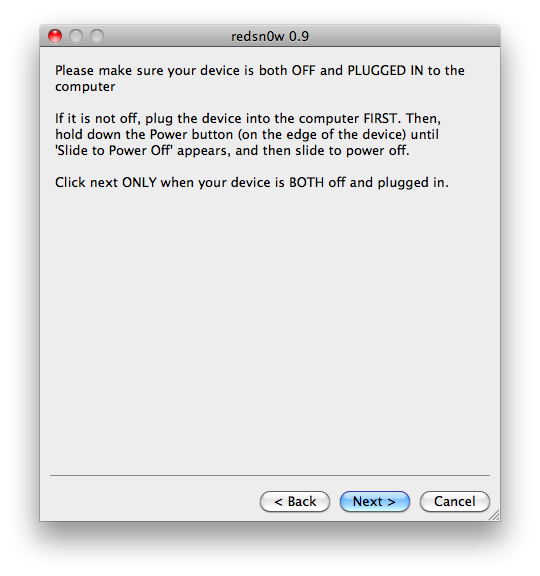
    Please plug your iPhone into the computer and make sure its OFF then click the Next button


    Step Ten
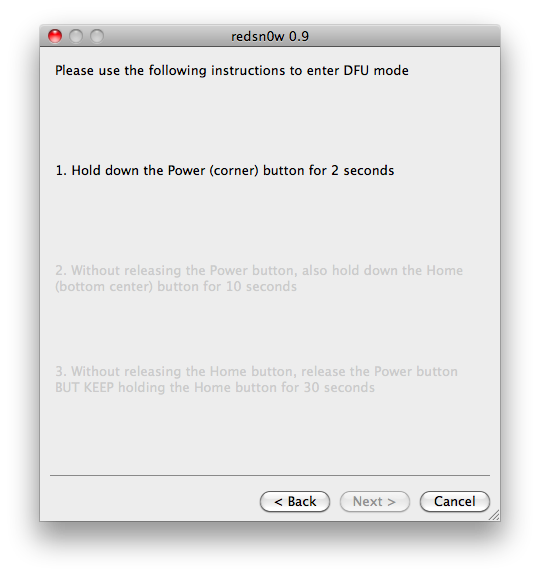
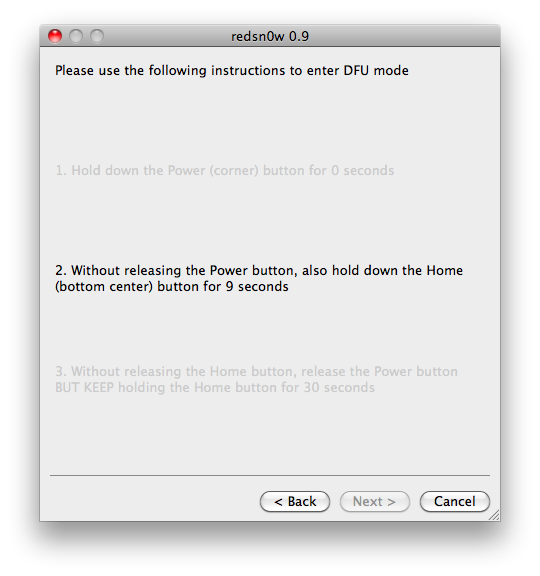
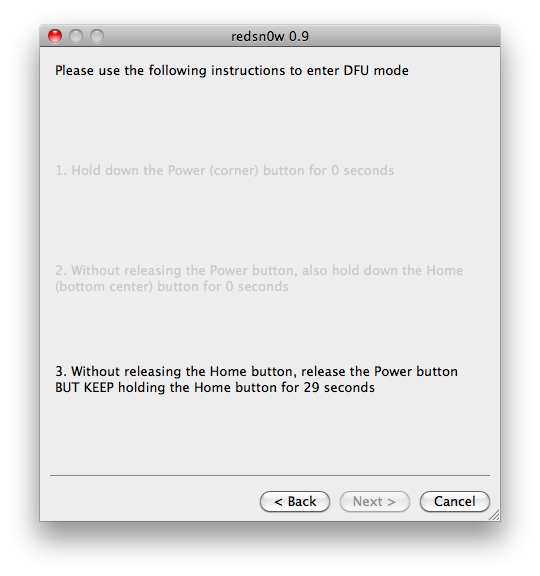
    RedSn0w will now guide you through the steps to get into DFU mode. You can find more help with DFU mode here


    Hold down both the Home button and the Power button for 10 seconds.


    Release the Power button and continue holding the Home button until RedSn0w detects the device.


    Step Eleven
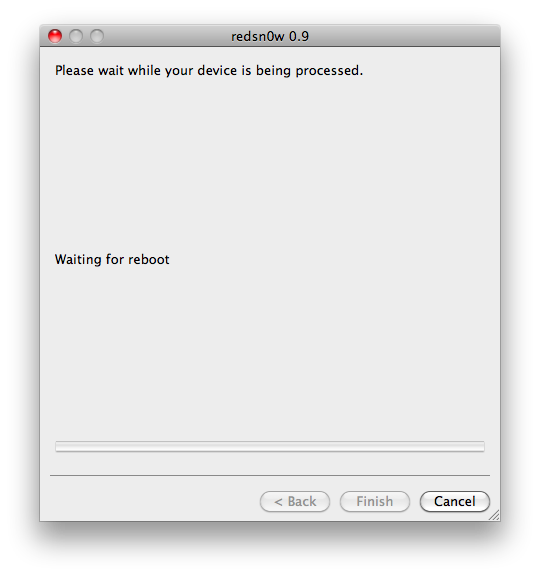
    Your iPhone will now reboot


    Step Twelve
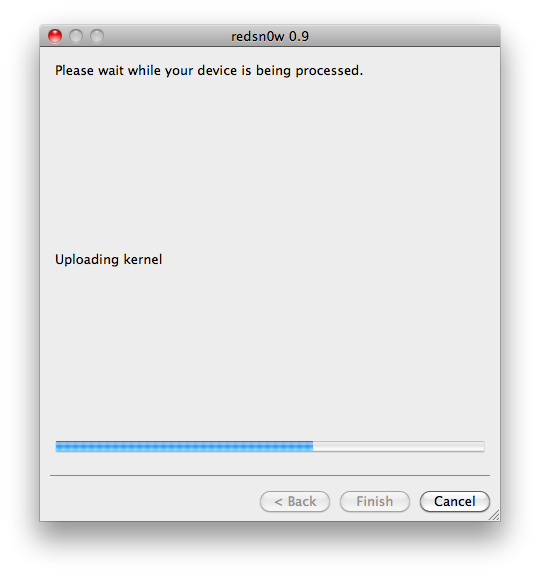
    RedSn0w will then begin uploading the new RAM Disk and Kernel.


    Step Thirteen
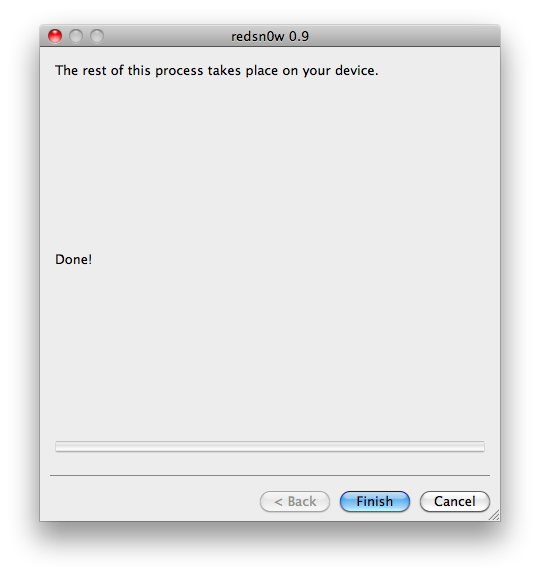
    Once this is complete you will be notified that RedSn0w is done. Click the Finish button. When your iPhone finishes rebooting (5 minutes or so) it will be jailbroken with Cydia on the SpringBoard.

    Twitter Delicious Facebook Digg Stumbleupon Favorites More